vrijdag 27 februari 2015

Blog 11: What are megapixels and why should I care?

The past decade, all camera manufacturers have been waging what we photographers call a “megapixel war”. One week, a brand would release a 10 megapixel camera, the next week a competitor would release a camera with 15 megapixels. The term “megapixel”, also revered to as MP, has become somewhat of an sales pitch in itself. But what is a megapixel and why should you care? Is more megapixels always better? What are the pros and cons of having more megapixels? In this blog, I will try to answer these questions.

What are megapixels?

A pixel is a light sensitive cell that resides on a sensor (figure 1). The amount of MP is a term for the amount of pixels on a sensor. If a sensor contains one MP, it holds 1.000.000 pixels! That means that a sensor with 10 MP holds 10 million pixels. 


Figure 1: coloured pixels on a sensor

The amount of pixels on a digital sensor is comparable to the resolution of a computer screen. Nowadays, a resolution of 1280x1024  or higher is most common. This means that the computer screen has 1280 pixels aligned horizontally and 1024 pixels vertically. This amounts to approximately 1.3 megapixels. Digital sensors now have a much higher resolution than that. For instance, a 20 MP sensor has a resolution of 5184x3456. This means that it contains 5184 pixels horizontally and 3456 pixels vertically and a grand total of 20.000.000 pixels! But what are the advantages of having that many pixels on a sensor? Don’t “they” always say that the amount of MP on the sensor don’t matter? Let’s see if that is true.


Advantages of high MP camera’s

There are two major advantages when it comes to having a lot of MP. The first, and foremost, is the fact that a high amount of  megapixels means more data being collected. This results in more details in the photograph. Figure 2 depicts this. Keep in mind that every block is one megapixel, thus contains 1.000.000 pixels.


Figure 2: amount of pixels on a sensor. More pixels means more details captured.

This effect is most obvious when taking photographs of a scene with a lot of small details. For instance, grass in a landscape or cloth during a portrait shoot. When you look at figure 3, which is the same as figure 2 but with added grass, you will see what I mean by this. The 8 MP sensor has just 2 vertical MP to capture the entire height of the grass, while the 48 MP sensor has 6. This simply means that the 48 MP sensor will capture 3 times as much details in the vertical axis than the 8 MP. In photography, this is often called  “resolving power”. In other words: will you see very blade of grass as an individual object, or does it become a green blur?


Figuur 3: More datapoints (pixels) means more details

The second great advantage has to do with printing. More megapixels will allow you to print your work on bigger formats without the loss of quality. Of course, you don’t need 20 MP to print photographs of 10x15cm. However, if you want to print a poster of let’s say 160x240 cm, you will need all the pixels you can get. This all has to do with something we call PPI, or Pixels Per Inch. The higher the PPI, the sharper the prints will be.

Now, a rule of thumb, depending on who you ask, is that the minimum PPI must always be 150. Using this fact we can set up a formula to calculate the maximum enlargement of the digital photograph.

The formula reads:


This means, for a photograph with a 10 MP resolution (3648x2736 pixels), that the maximum enlargement is 3648/150 = 24,32 inch, approximately 60 cm in length. The maximum width then is 2736/150 = 18 inch, approximately 45cm. So the maximum magnification of a 10MP photograph is approximately 60x45cm. If you want to print larger than that, you will have to lower the PPI and thus get a less sharp image. It is kind of hard to find a digital camera with less than 18 megapixels nowadays so, if your are not planning on making prints bigger than 60x45 cm, you don’t really need to worry about high megapixel count. However, if you are planning on making billboards, wallpaper, life size posters of yourself (or a foxy model), you might want to consider getting a camera with more megapixels. For comparison, here is the same size photograph, the left one is 300 PPI, the right one 50 PPI.
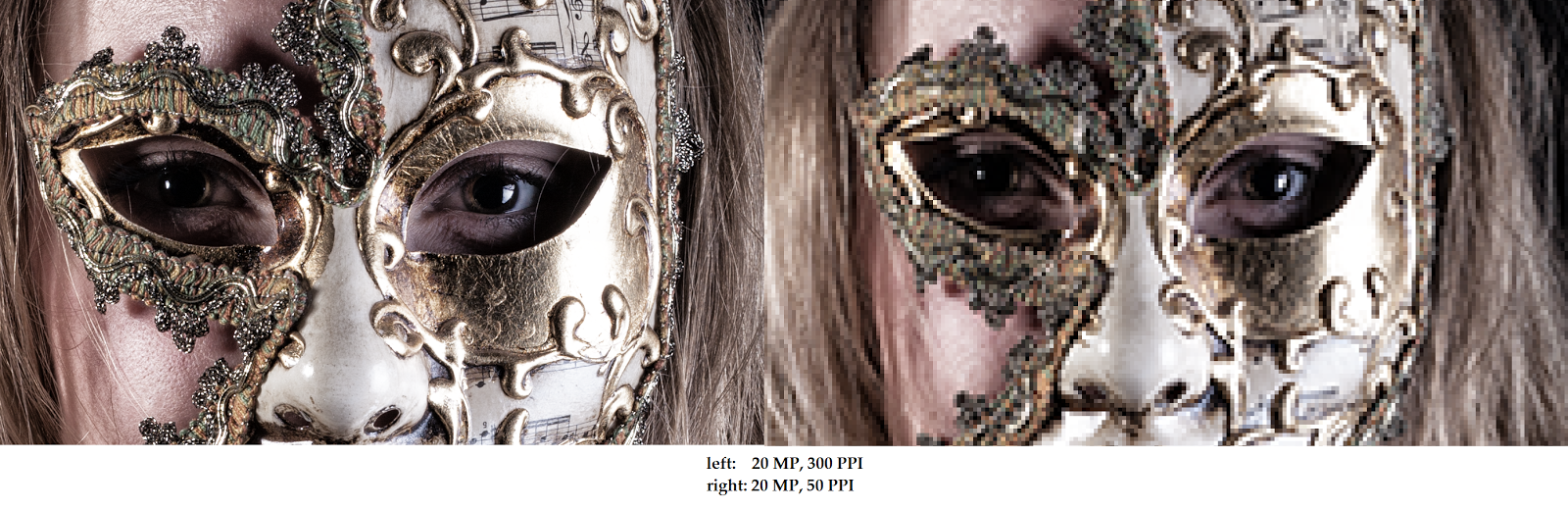


Figure 4: PPI comparison

Disadvantages to high megapixel count

Of course, as with everything, there are some disadvantages when it comes to having a lot of megapixels on your sensor. Perhaps the biggest con is that of image noise. Image noise is created by pixels that start “leaking” light on the neighbouring pixels because they are full. This is comparable to an ice cube tray. If you have 8 (or 12 as in this example) slots in this tray, you can fit in a decent amount of water in them before the slots start leaking into others.

Figure 5: more pixels on the same surface means smaller pixels

However, change the amount of slots to 48, as in figure 2, but keep the sensor size the same, and the pixels will have to be much smaller. Smaller pixels leak light faster, thus creating more image noise. If you raise the ISO on you camera, the pixels will be more sensitive to light and thus be “full” quicker.


Figure 6: image noise at high ISO settings

Of course this is not a problem when shooting landscapes. That is, if you brought a tripod as all landscape photographers should, or if you shoot in a studio where you can cater the light to your needs. It will become a problem for a street- or wedding photographer that have to up their ISO values indoors or during dusk, to keep a fast shutter speed. So the amount of megapixels that are useful to you, depends on what you want to do. High megapixel cameras are more suited for landscape and studio photographers, while lower MP cameras (creating less noise) are more suited for street-, wildlife- and wedding photographers.

A second disadvantage of a high megapixel count is that lens flaws become more obvious. All lenses contain minor flaws that cause aberration( figure 7), deforming, vignetting etc.


Figure 7: lens flaw: chromatic aberration

Lenses that use fluorite glass have less problems with lens flaws but are more expensive. It is safe to say that all flaws in a lens subtract from overall image quality. Therefore, if you want to use a camera with a high megapixel count, you should also buy adequate lenses (read: the more expensive ones).
That being said, I sometimes see people buy a very expensive camera body. Because the body is so expensive, they don’t have enough money for proper glass, so they buy a cheap lens with it. This is a very common mistake. The cheap lens will not make the most out of the resolution your expensive body will offer. Instead, do the opposite. Buy a more expensive lens with a less expensive body and your photographs will contain more detail, more contrast and more colour! Of course, if you want the best, go for a high megapixel camera (if you shoot studio or landscape) AND get an expensive lens.

One last disadvantage of a high MP count is the file size. A RAW file made with a 20 MP camera is approximately 25 MB. If you have a 40 MP camera, it will quickly shoot up to about 50MB per photograph. This means you need bigger memory cards, a faster PC and more hard drive space. Also, because of the higher resolution, you have to spent more time processing the images because you will see every little flaw in that models skin, every crooked hair, every speck of dust..

So, In summary:
-         - The amount of megapixels that is USEFUL for you, depends on what you want to shoot
-         -  High MP count means more details In your photographs
-         - High MP count means bigger enlargement without loss of quality
-         - Less MP means less image noise at higher ISO values
-         - Less MP means less bothersome lens flaws
-         - More expensive lens on a cheaper body is better than the other way around

So much for his blog! I hope that you have once again learned something useful. Check out  http://photojitsu.nl/blogpost.html for more blogposts and useful stuff to read about photography. In addition, if you want to follow me and my work, or just want to drop in to say hello, check out my facebook page www.facebook.com/photojitsu or twitter @photojitsu_nl.


Until next time!

woensdag 7 januari 2015

Blog 10 Travel photography: Equipment and tips

Travel photography – equipment and tips
It is finally happening. After months of saving, planning and searching you have decided to travel to Asia for 4 weeks. Because photography is your biggest hobby, you want to make sure you take the best pictures possible and that you visit all the great sites a country has to offer. After you finished packing your suitcase, it is time to charge your batteries, clean your lenses and pack your camera bag. That’s when you ask yourself: what do I take with me? Or maybe even more important: What do I leave behind?

My girlfriend and me just came back from a four week trip to Asia. Our trip started in Cambodia (Siem Reap), then we travelled to Laos (Luang Prabang) and our trip ended in Vietnam, where we visited Sapa and Halong Bay. In this blog, I would like to share with you my experiences of this trip in regards to what equipment to take and how to take home the above average photographs that we all so desire. I will start with the equipment that I carried with me.

Equipment
The first thing you have to make sure is that you are carrying a comfortable and reliable camera bag. I myself have a Click Elite Pro Express. This bag has a “lock” systems for the zippers, that clamps your zipper to your bag. If anybody tries to open your bag, he will swing it left and right and you will notice. So no sneaky lens stealing! To protect your equipment during changing weather, it is also advised to have a bag with a build in rain sleeve, or to carry one separately. The following equipment I took with me on my trip:

-          Canon EOS 5D Mark II with battery grip
-          Canon EF 135mm F2.0 L USM
-          Canon EF 24-105 F4.0 L USM
-          Sigma 35mm F1.4 Art DG HSM
-          Cleaning gear (lenspen, bellows, microfiber cloth)
-          3 CF cards of 8 gb (16gb in the camera)
-          Redged TSC-424 Ultimate Travel Tripod Carbon Gold Edition

Since this camera bag was my hand luggage, it had to stay under 7 kilograms. Sadly it didn’t, so I had to put the tripod in my suitcase. Don’t forget to weigh before you check in at the airport! To save some weight, your can of course take one lens that covers a large range i.e. 18-200. This however, has a negative effect on image quality, as can be read here.

It is always wise to take a standard zoom lens with you. This lens will stay on your body for 90% of the time. The other two lenses I carried are fast. This comes in handy when you want to shoot some photographs at night and don’t want to up your ISO too much or if you want to work with shallow depth of field (DoF).

During the day I carried my Canon EF 24-105 F4 L with me. This lens allowed me to shoot landscapes (24mm) and portraits (105mm) and still maintain good image quality. The only time I brought my 135mm during the day was when I was absolutely sure that I was going to shoot portraits. I could’ve done this with my 24-105, but I prefer the 135mm for portraits. In fact, the 135mm is my favourite portrait lens! I did not take my tripod during the day because I did not need it.

Figure 1: Canon 24-105 op 100mm F8 Luang Prabang, Laos

Figure 2: Canon 24-105 op 24mm  F8  Sapa, Vietnam

In the evenings, I left my standard lens in my hotel and put the 35mm prime on my camera. The 135mm I took with me as well. Because these lenses are “fast”, it will enable the user to shoot some handheld photographs during low light without raising the ISO too much.

Figure 3: Sigma 35mm nightmarket in Siem Reap, Cambodia

Figure 4: Canon 135mm old woman op de night market. Luang Prabang, Laos

How do I bring  good photographs back home?
If you are going on a trip if this magnitude (any trip really), you want to take home the best photographs possible. What makes this hard is that your can mostly visit every site only once. Often, there is no chance to visit the same place twice, especially in the middle of the jungle, to retake a photograph. Add to this the fact that, especially during group travels, you often don’t get to choose where you will be on what time of day, so you cannot wait for the perfect light. Luckily, there are some things you can do in preparation, to make sure you have the best chance at getting those beautiful photographs.

The tip I want to give: Make sure you know your camera by heart. I lost count of how many photographers I have seen, missing great moments, like the playing children on the cart, because they were fumbling around in the menus of their cameras. You don’t want to stand there twisting dials for ten minutes. Not only does this make you miss some moments, it might make you miss the entire scene if the guide or the other group members want to move on to the next spot. So before you go on a trip, find out how to change ISO value and what value is acceptable for you (or when your camera starts to produce too much noise). Find out how to change the aperture and at what aperture your lens gives the sharpest images etc.

Figure 5: playing children in Sapa, Vietnam

The second tip: prepare. Read information about the countries you are visiting. Google is your friend. The internet is full of blogs and stories like this one, make them work to your advantage. Preparation is of course finding out what country you go to, what language do they speak, what defines their culture. More importantly though, make sure your know where you are at what time of day and what kind of pictures you want to take (to match your equipment).

For example, for landscape photography you need beautiful light. This light is available during sunrise and sunset and approximately one hour before and after these events. However, you don’t get to choose where you are at that time, given you travel in a group and have a set schedule. So you should take this into account when preparing.

When you want to do landscape photography (example again), make sure you bring a polarising filter and a graduated filter. This somewhat helps preventing colour cast and blown out skies.

 
Figure 6: landscape photograph, middle of the day

If you want to shoot portraits (one jungle tour took us to some remote villages of the Hmong people), bring your portrait lens etc.

The people in Asia sometimes expect you to pay them for a photograph, or that you buy something off of them. Don’t be fooled by giving them large amounts of money, most people settle for about 20 dollar cents. The old lady in figure 7 insisted that we buy something from her which, given the quality of her posing skills, seemed very reasonable.
  
Figure 7: An old woman in a remote village in Sapa, Vietnam. Luckily I brought my portrait lens!

Don’t be afraid of taking loads of photographs. Bring enough memory cards and fill them if you have to. Normally I prefer quality over quantity but, because you can visit most sites only once, it is better to take 100 photographs too much then 1 too few! Be sure to get some knowledge of the subjects you want to shoot, this being portrait, landscapes, streets or whatever. This helps taking good photographs faster and more efficient.

The third and final tip: don’t forget to enjoy yourself! Of course it is very tempting to practice photography every single minute of the day. Maybe you feel ambitions hot breath in your neck, or perhaps you see the shining glory of a National Geographic Magazine cover photo, but the most important thing is that you experience and enjoy the surroundings and people. Don’t be afraid to lay down your camera once in a while, hang it around your neck or just leave it at the hotel. Photography is about observing and that doesn’t always have to be done looking through a lens.

I hope you enjoyed this blog as much as I had writing it. I had an amazing trip through Asia and, in my eyes, brought back some really good and special photographs. If you have any questions, or if you want to follow my work, you can find me at Facebook, Twitter or email.  See you next blog!

I added some more photographs of my fantastic trip!


 Figure 8 Sapa, Vietnam

Figure 9 Kuang Si waterfalls, Laos

Figure 10: swimming in paradise, Laos

Figure 11: Street image, Laos


Figure 12: boy with chicken
Figure 13: child of the Hmong


Figure 14: Children in Laos
Figure 15: Child with puppy


maandag 7 juli 2014

Blog 9: Low light photography

It happens to us all. You get an assignment or are asked to photograph during an event. Arriving on the scene, you realize that the only available light you get is candle light. Furthermore, the room is crowded and small. You think: no problem, I will use my flash. The result: gone is the atmosphere, the front row is too light, the back row too dark. What now?

Lenses
The first thing you should make sure is that you always bring a “fast” lens. Fast lenses are lenses that have small aperture values (i.e. F1.4 or F1.8). The smaller the aperture value, the less light you need for a good photograph. A 50mm F1.8 will cost you around 99 euros. There is a reason why they call it the “plastic fantastic”! For the photographs in this blog, I used a Sigma 35mm F1.4 Art. Remember to use wide angle lenses instead of tele ones. The minimum shutter speed for hand shot photographs is 1/shutterspeed which means that, when a 135mm lens is used, a shutter speed of 1/135s is necessary. In contrast, when you use a 35mm lens, the minimum shutter speed only has to be 1/35s, much longer! A disadvantage ofcourse, is that you have to get close to the subject.


Figure 1: Fast lenses will save you!

ISO
Don’t hesitate to increase the ISO on you camera. Normally, I never go above ISO400 on my Full Frame camera. However, in difficult lighting situations, ISO400 is not going to cut it. Not even when using a fast lens! Most photographs in this blog were taken using ISO800 or ISO1000. Modern software is perfectly capable to reduce noise in your photographs without a significant setback in sharpness. Keep in mind that noise is more apparent in dark areas of a photograph then the lighter ones.

 
Figure 2: ISO1000, well lit parts of a photograph suffer less noise then darker parts


Focus en composition
Because you will be working with a wide open aperture, your depth of field will be narrow. Even on a 35mm lens. This means that you don’t want to try making group shots with everyone in focus. It is not going to happen! Instead, focus on the individual. Not only will this make the atmosphere seem more palpable, it will also enhance your composition because the viewer has something that stands out to look at.

Figure 3: focus on the person in the middle

Figure 4: Focus on the candle

Flash vs tripod
If you do not own a fast lens, or if you don’t want to increase your ISO value, you have to choose to use either your flash or a tripod. I strongly recommend NOT using your popup flash because you do not have control over it. It just flashes. If you own a Canon Speedlight 580 EX or equivalent, you have far greater control over the situation. Use as little flash as possible. Aim the flash towards the ceiling or, if that doesn’t give you the desired effect, behind you. This will diffuse the light and make it look softer and you will keep most of the atmosphere.

Figure 5: flash towards the ceiling. ISO200, shutter speed 1/100s

If all the above fail, you might be able to use a tripod. Using a tripod however, might be tricky since there is not always enough space. Remember you can use tables and chairs as tripods as well! In addition, using a tripod (and with it, slower shutter speeds) will result in a sharp environment but blurred people! This might be cool as an effect, but it will create a rather one sided impression of the evening!

So, to summarize:
-         -  Use fast lenses
-        -   Up your ISO value, the software will sort it out
-        -  When using a flash, make sure to aim for the ceiling or behind you
-          - Focus on the individual instead of the group (because of the wide open aperture)

Well that’s it for today. I hope you had fun reading this blog and I hope you can use these tips to your advantage!  

For more blogs, or to see my photography work, hop on over to www.photojitsu.nl or like us on Facebook www.facebook.com/photojitsu. Until next time!


maandag 7 april 2014

Blog 8: Low Key photography

Blog 8: Low key portrait photography
Hello and welcome to my newest blogpost. Today I would like to discuss “Low Key portrait photogaphy”. I reckon everybody knows what portrait photography is, but I can imagine that not everyone knows what low key means. Low key is basically shooting with insufficient lighting, bei t in the entire photograph or a part of it. I will start off with two examples of low key portrait photography and then explain how I made these photographs and how you can too!


This is example one. In this photo (yes this is me, so it’s a selfie), insufficient lighting was used to create a low key effect on the entire body. The face and the left side of my body are clearly visible while at the same time, my legs and the right side of my body has dissapeared into the blackness. This gives the photograph a very distinct look. Some might argue that it makes people look more chique or “classy”. For me, it is a great way to cover up those extra kilo’s! Ofcourse the kilo’s reappear when you switch the lights back on.. Right, moving on.


Example two. In this example, insufficient lighting was used to create a low key effect on the face. As can be seen in this photograph, the left part of the face is highlighted while the right side is lost to the shadows. The amount of face lost can be adjusted by using a reflective screen, but I will speak about that in the next part of this blog. As in any form of portrait photography, focus on the eyes is very important. People truly speak through their eyes. By the way, this slightly older, balder and leaner version of me is my brother J.


These two photographs were made in the same way. The only difference was the placing of my studioflash and the reflective screen. The easiest way for you do practice low key photography is in a dark room with the use of a single external flash and a reflective screen. If the room is dark enough, the background will not matter. However, you might want to invest in a matte black background. I usually use the following setup:


In this setup, the flash will come from your right, lighting up the face and/or body of that person. The reflective screen will cause part of the face on the dark side to show some detail as in the following example.


The reflective screen has caused this woman her eye to light up. Odd, calling my girlfriend “this woman”. Ofcourse, the intensity of the light is controlled by adjusting the power of the flash. Professional flash equipment usually has the ability to adjust the power of the flash in several steps. You will have to experiment with different light intensities to determine what works best for you. If you want to remove the detail from you dark side of your model, simply remove the reflective screen (as with my brother).


The easiest way to learn low key is just by doing. You can use any off camera flash but I strongly suggest buying one or two professional flash units as they offer more control and are more powerful. I use the Lastolite Lumen8 F400, a 400 Watt flash unit, which is sufficient for small studio’s and not more then 2 or 3 people. Needless to say, more power means more light, suitable for example for large groups of people.

Well there you have it. My 8th blogpost! I hope you enjoyed the read and if you have any further questions, don’t hasitate to ask!

Here are some more examples:


vrijdag 25 oktober 2013

Blog 7: Autumn photographing

7. Making Autumn photographs.

Hello and welcome back once again. In today’s blog I would like to cover the subject of colour change in your photograph. More specific, I would like to explain to you how you can make those autumn forests really look like autumn forests. But before I get to explaining the Photoshop tricks you will need, we will take a look at the situation.

I was born and raised in a town called Heiloo. Heiloo is a small town (approximately 22.000 people) in the Noord-Holland province of the Netherlands. As a kid, my parents often took me for a walk in the forest of Heiloo, conveniently called the Heilooër forest. This forest is hundreds of years old and got its name from back in the Germanic era when it was called “heiliger loo” which means Sacred Forest. I still love to go here. Not only for sentimental reasons but also because I think it is really beautiful there.

On to photography then. When I walk through the forest, I see all kinds of colours. I walk around with my camera and my tripod (not a lot of light in the forest because of all the trees you can find there J) and take photographs of lanes, hills (there is one, yay), people and benches. After a few hours I go home and sit behind my computer to look at the photo’s I have taken. My minds’ eye has given me all these memories of the past few hours, portraying golden forests with blood red leaves.


But when I open my photo it looks like this, and I am like: what? No, this can’t be right.. Green?! But it was all golden and red and magical!
Well sad truth is that what you perceive isn’t always what is actually there. A camera is really an honest object, it only captures what is there. So that is where Photoshop comes in handy.

Photoshop (or any other similar program I know nothing about) allows me to recreate what I have seen with my third eye from what was actually seen with my regular ones!

There is a (free) Photoshop manual on my website that explains in easy steps how to achieve this for any photo. You can find that here: http://photojitsu.nl/psguide.html.
In this blog I would like to concentrate on the picture on the left here, which is basically the same as any other photograph.
Ow well, moving on!


First we need to open the photograph in Photoshop and do the basic adjusting like local contrast and highlights. If you don’t know how to do this, please refer to the manual on my website.

After you have opened the photograph and did the basic adjustments, it is time to alter the colours. To do so, select “new adjustment layer” and then click on “hue/saturation”.
Here you will see all kinds of sliders. First thing you want to change is the settings next to the little hand with two arrows. By default this says “master”. Changing hue in master mode will change the entire picture. What you really want to do is set it to a select colour. Now most of us (including me) would assume that the colours in this photograph are mostly “greens”. However, according to PS, most colours are in the “yellows” range. So first change this setting from “master” to “yellows”.


Use the slider “hue” to change the colour of all the yellows in this photograph. I prefer to make them an intense red colour.


 After you are satisfied with the “yellows”, switch the settings to “greens”. Now adjust the greens in such a manner that they appear as the colour you want, in my case a bright yellow. After you are done, just click anywhere in the photograph to exit the layer and return to the actual photo.

When done, the photo will look a little something like this. As you can see, it is lacking a bit in the contrast department. There are two things you can do here. The first is using a simple contrast/brightness layer (found under the same menu as the hue/saturation) and up the contrast of our photograph. However, there is a second technique I want to tell your about. This technique works very well for any photo that should have a nice magical glow to it. Handily, it also adds contrast to your photos.

To create this effect, I use something called the Orton effect. The Orton effect, or simply called Orton, is a technique in which you duplicate your base layer, add a Gaussian blur and then change the setting of that copy to “overlay”. This technique is also described in my Photoshop manual.


In short: press CTRL+J to duplicate your base layer. Go to filteràblurà Gaussian blur and apply a blur effect with a radius of approximately 40 pixels.


Press apply and set the blending option to “Overlay”.


You will notice that the photograph is way too dark and saturated. To adjust this, simply change the opacity until you find it suitable (in this case around 60%).


Your photograph should look something like this now. The colours are bright, contrast is high and it has a nice soft glow to it.

Basically we are done now, the colours and light are how I have seen this forest with my third eye. However, I felt like there was something missing.


I always like photographs like this to have some human reference in them so I decided to add just that.


I took a silhouette from a man I shot in another photograph and I added him to this one. Can you see him? The man that always walks through this forest. I have no idea who he is or what he is doing. He’s just always there, in the distance, walking..


And there you have it. I have changed a real photograph of the Heilooër forest into a photograph of the way I see the Heilooër forest.  If you have any questions regarding this blog, or one of the others (yeah, there is more! J) please feel free to contact me at info@photojitsu.nl. Like my work? Why not have a look at www.photojitsu.nl or www.facebook.com/photojitsu .


Blog 15: The Orton Effect

The Orton effect One of the questions I get asked very often is; how come some of your photographs have such a dreamy look to them? Well...